Welcome to The Complete Proxmox Mastery Guide
Follow The Series Here:

Welcome and What to Expect?
If you are reading this, welcome to what I hope is the best and most robust homelab community on the internet! Not only that, but I hope this is the best hands on Proxmox course you will have came across and ever need to understand all the ins and outs of Proxmox to be a power user within your homelab or within a professional environment!
About Me:
Who am I? Well I am Abe! I have an educational background in Cyber security where I hold a Bachelors and Masters degree in "Information Assurance and Cyber Security." I am also a Marine Corps veteran and currently participate as a Network Engineer part time in the National Guard. My full time job is within a SOC where we see over 5 MILLION daily users across our network, and I run one of the teams of super smart SOC analysts within that organization. I started my journey with computers at a professional or serious level in 2014. Since then, I really have not given computers up. I also love to travel, you will probably hear me talk about traveling at some point so do not forget to let me know where you love to travel to in the comments on our videos!
What Does This Course Teach?
This list is bound to change as I create more of the videos, but I wanted to give you a good idea of what you will learn in this course. It will also change on what I feel is worth teaching and other things which I feel will not really apply to most:
- Introduction
- Installing Proxmox VE
- Proxmox GUI Overview
- Host System Administration
- VM Management
- Container Management
- Storage Management
- Network Management
- Backup and Restore
- High Availability
- Proxmox VE API
- Proxmox VE Mobile
- Metric Server
- External Metric Server: Prometheus
- Command Line Tools
- Proxmox Cluster File System (pmxcfs)
- Authentication
- User Management
- Permissions
- Role Based Access Control (RBAC)
- Project Management
- Notifications
- Proxmox VE Firewall
- Certificates
- Proxmox VE API Tokens
- Proxmox VE Ceph
The Topology
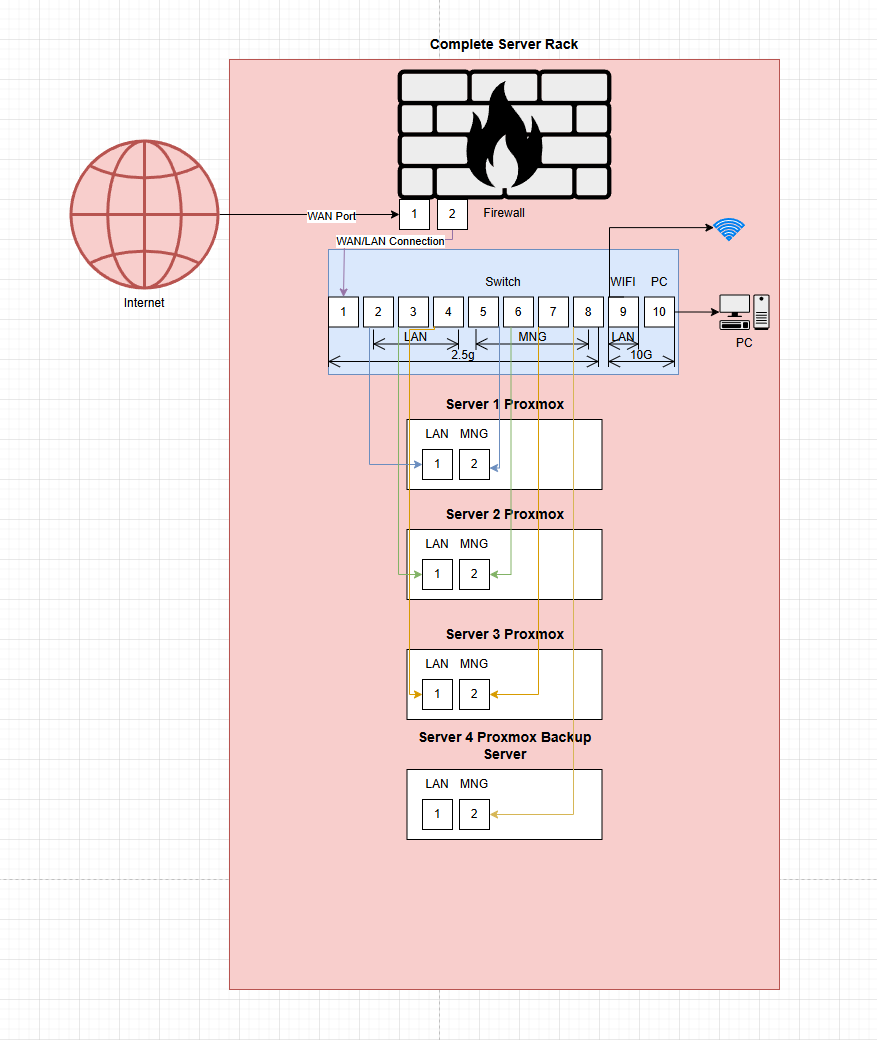
If you would like to get an idea oh how we have the network set up, see the image below. For the purpose of this series, we are really only focusing on the three Proxmox nodes (Proxmox 1-3).
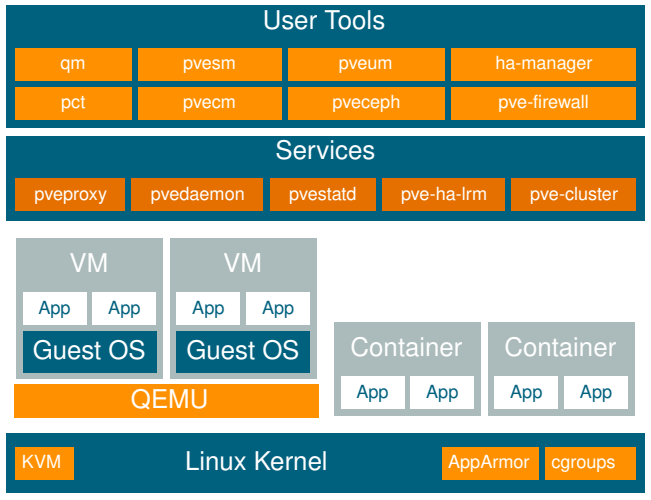
Proxmox Technology Overview
Here is a picture that explains how Proxmox as a software technology is set up. The bottom of the picture is the root Linux Debian OS, and the top of the image are the Proxmox services/tools you as the Proxmox admin will use to administer the environment.